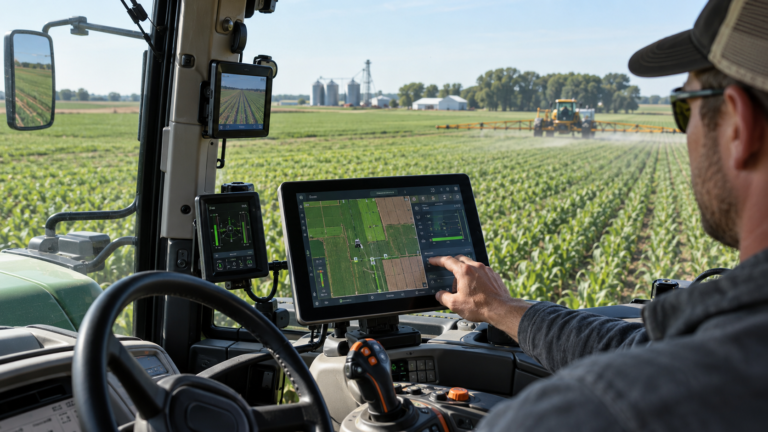
A tractor appears in the dashboard. A prescription map reaches the terminal. The job finishes, but the manager cannot reconcile the returned application record. In this illustrative scenario, farm equipment data sharing connects the systems without delivering the information the business needs.
Useful farm equipment data sharing must carry a plan into the field and bring an interpretable record back. That makes it a practical part of agricultural data interoperability: connecting separate systems so their information supports operational decisions.
Mixed-brand connections are improving. These five gaps explain why a working connection can still produce an incomplete workflow, and what to check before buying.
Key Insight
Judge farm equipment data sharing by a complete job: send the plan, perform the operation, and retrieve a usable record. Ask suppliers to demonstrate that sequence with your equipment, software versions, and required data.
1. ISOBUS Compatibility Does Not Cover the Required Function
An ISOBUS label alone does not tell a buyer whether the intended operation will work. The Agricultural Industry Electronics Foundation (AEF) explains that equipment works together according to the functions its components share. Its database supports checks of specific tractor, terminal, and implement combinations. [1, 2]
For farm equipment data sharing, distinguish displaying implement controls from handling the task data needed for documentation or variable-rate application. A demonstration of basic controls leaves those additional requirements unanswered.
Practical check: Ask the dealer to identify the required ISOBUS functionality, check the exact combination where listed, and record relevant product and software versions. Then demonstrate the intended field operation.
The buying decision is whether farm equipment data sharing supports your particular job. Start with that requirement before comparing broader feature lists or deciding to replace hardware.
2. ISOXML Task Data Is Imported Incompletely
Two systems may support the same format while implementing parts of it differently. AEF documented in 2021 that ISO 11783 implementation variations could cause data loss or restricted functionality, including between farm management information systems and tractor displays. Its update connects ISOXML task exchange with Part 10 of ISO 11783. [3]
Here, farm equipment data sharing breaks at the file-interpretation stage. The relevant question is whether the receiver imports the required information, even when a transfer notification says the file arrived.
AEF’s documented concern covers workflows involving field boundaries and prescription maps. It does not identify a specific field dropped by a named product. A buyer should therefore request a representative import demonstration rather than assume a particular manufacturer’s software loses those elements.
Practical check: For farm equipment data sharing through ISOXML, export a real planning file and compare the source with the terminal’s imported view. Confirm the field, boundary, prescription, and required instructions, then inspect the completed-work export.
Keep both files and the software-version details. This gives support staff evidence of where farm equipment data sharing first diverges from the agreed result.
3. Field Identities and Units Do Not Match
A fully readable file can still describe the wrong field or an ambiguous measurement. This gap concerns meaning: matching records and interpreting their values after import.
AgGateway’s ADAPT documentation describes shared definitions for operational items such as farms, fields, products, and machines. It also provides for persistent identifiers from different systems to refer to the same object. [4]
That matters because farm equipment data sharing cannot rely solely on familiar-looking field names. A contractor’s “North Field” and a farm’s “North Field” need an agreed identity and boundary before records are combined.
Worked Example: A Rate Keeps Its Number but Loses Its Unit
Consider an illustrative reconciliation error: an export records 100 kilograms per hectare, but the receiving report labels the unchanged number as 100 pounds per acre. The correct conversion is approximately 89.2 pounds per acre. Merely relabeling 100 would overstate the reported rate by about 12.1%.
This is a worked calculation, not a documented product failure or an instruction to change an application rate. It shows how farm equipment data sharing can produce misleading reports even when every row imports successfully.
Practical check: Agree field identifiers, product mappings, units, and timestamps. Ask how unknown values or renamed fields are flagged. For farm equipment data sharing acceptance, compare a known measurement with its correctly converted result in the destination system.
4. The Cloud Integration Exchanges the Wrong Data
Machine location, engine information, prescription maps, and completed-work records answer different questions. A connection useful for fleet visibility may not deliver the records needed to evaluate an application job.
CNH’s November 2019 announcement distinguished DataConnect’s machine-data role from agrirouter’s task-data role. That is historical context for the distinction, rather than a current specification for every service. [5]
For farm equipment data sharing, specify both the record type and direction before evaluating a cloud connection.
agrirouter and John Deere Operations Center: What Changed?
In September 2026, agrirouter announced bidirectional integration with John Deere Operations Center. Its documentation describes planning information and work records moving into and out of the Operations Center. [6, 7]
For buyers, the useful distinction is that external planning information can enter the Operations Center, while work plans can also be addressed to agrirouter endpoints. Work records have corresponding inbound and outbound flows. These are supplier-described capabilities; check support for your selected endpoints. [6, 7]
Practical check: Define farm equipment data sharing as a specific request: “Send this prescription from our software to this machine, then return the completed-work record to this account.” Have suppliers demonstrate each direction and identify the included data types.
5. Access, Connectivity, and Service Terms Leave Gaps
A compatible connection still needs authorization and an operating process. agrirouter describes account-owner authorization and configured routes; its technical update says legacy integrations require provider-side work to migrate to the new REST software interface. [6, 7]
This is the delivery and service layer of farm equipment data sharing. Separate a missing permission or route from unsupported equipment before paying for replacement technology.
Connectivity belongs in the same acceptance test. Ask what happens when mobile coverage disappears: whether records remain stored, when synchronization resumes, and how users see failed transfers. Set an acceptable delay for the job rather than assuming every cloud workflow delivers immediately.
Cost also affects whether farm equipment data sharing is worthwhile. Request written terms for hardware, connectivity, subscriptions, feature activation, export access, and support. These are questions for the chosen suppliers, not claims that each item always attracts a separate fee.
Practical check: For farm equipment data sharing, agree who authorizes accounts, investigates missing records, handles integration changes, and pays recurring charges. Demonstrate interruption and recovery under supplier guidance, including checks for duplicate records after a retry.
Five Checks for Farm Equipment Data Sharing
Use this table to distinguish equipment functionality, file interpretation, record meaning, exchange scope, and delivery. A workflow may have more than one gap.
| Gap | Relevant tool or approach | Buyer acceptance check |
|---|---|---|
| Required function missing | ISOBUS functionality checks; AEF database | Exact equipment combination performs the intended operation |
| File imported incompletely | ISOXML implementation and conformance information | Required planning and returned-record information survives import/export |
| Records interpreted differently | Shared definitions, identifiers, and units; ADAPT resources | Field identity, product, units, and timestamps remain meaningful |
| Wrong data type or direction | Supported cloud integration, including agrirouter | Required plan and work record move in the intended directions |
| Delivery or service gap | Authorization, routing, recovery test, written terms | Records arrive within the agreed time, with accountable support and known costs |
AEF and AgGateway address complementary aspects of these checks. AgGateway introduced ADAPT Standard in 2024 as a separate resource alongside its Framework and plugins. Supplier implementation still determines how a particular workflow uses these resources. [1–4, 8]
Test Farm Equipment Data Sharing Before Expanding
Choose one representative field job and define a usable result before the demonstration. Include the person who prepares the plan and the person who reconciles the records.
For farm equipment data sharing, test the complete sequence: export, transfer, import, operation, return, and reconciliation. Use a controlled demonstration agreed with the supplier; investigate discrepancies before relying on the connection for production decisions.
Record missing information, manual corrections, transfer delays, and support requests. Measure preparation and reconciliation time so the business has a baseline for evaluating ongoing cost and workload.
For older machinery, request a model-specific assessment of the terminal, software, connectivity, and export options. Farm equipment data sharing may require configuration, upgrades, or additional hardware; the pilot should establish which changes the actual fleet needs.
Dealer Questions to Take to the Demonstration
- Which exact equipment and software versions are covered?
- Which ISOBUS functions and file implementations support our job?
- Which fields and units survive both transfer directions?
- Which record types does the cloud connection exchange?
- What happens during a coverage interruption or failed transfer?
- What are the recurring costs, export rights, and support responsibilities?
Keep the answers alongside the test results. This turns farm equipment data sharing from a broad sales promise into a requirement the farm can assess.
Farm Equipment Data Sharing: Common Buyer Questions
Is ISOBUS the Same as ISOXML?
No. ISOBUS refers to the ISO 11783 machinery communication and data-exchange framework. ISOXML task data is associated with Part 10. For farm equipment data sharing, check both the required machinery functionality and the file exchange. [1, 3]
Does agrirouter Work with John Deere Operations Center?
agrirouter’s September 2026 documentation describes bidirectional planning and work-record exchange. Verify endpoint support, authorization, and routes for the intended workflow. [6, 7]
Does a Successful Upload Prove Compatibility?
No. Farm equipment data sharing is complete only when the receiving system can use the required information. Compare imported values and the returned record, including identifiers and units.
What Should a Mixed Fleet Test First?
Start with one complete field job. For farm equipment data sharing, confirm the plan, operation, returned record, delivery delay, and correction effort before extending the connection across the fleet.
Make Usable Records the Buying Criterion
GAO’s 2024 assessment identified inconsistent standards as an interoperability obstacle in precision agriculture. [9] A farm can translate that broad challenge into a concrete procurement test.
Specify the job, verify the functions, inspect the records, test both directions, and assign responsibility for exceptions. Farm equipment data sharing succeeds when the business receives trustworthy information in time to use it.
Evidence note: This is a source-based analysis, not a field test. The scenario and unit example are illustrative; commercial capabilities are attributed to their suppliers.
References
- Agricultural Industry Electronics Foundation. ISOBUS. Undated. Original source.
- Agricultural Industry Electronics Foundation. AEF ISOBUS Database. Undated. Original source.
- Agricultural Industry Electronics Foundation. Data Management Update. July 5, 2021. Original source.
- AgGateway. Scenario 4 — Exchange of Operational Master Data. Undated documentation. Original source.
- CNH Industrial. CNH Industrial Joins Two Major Data Initiatives to Bring Mixed-Fleet Connectivity to Farm Equipment Customers. November 5, 2019. Original source.
- agrirouter. John Deere Operations Center × agrirouter: bidirectional, cross-manufacturer data exchange is finally possible. September 18, 2026. Original source.
- agrirouter. Tech Update · September 2026. September 2026. Original source.
- AgGateway. AgGateway Releases ADAPT Standard Version 1.0. June 18, 2024. Original source.
- U.S. Government Accountability Office. Precision Agriculture: Benefits and Challenges for Technology Adoption and Use. GAO-24-105962, January 31, 2024. Original source.